
Android Screen Black When Viewing Remotely
Why is my Android phone screen black when remotely viewing it?
Answer: Yet another barrier introduced by Google, "For your security". It's called FLAG_SECURE.
Basically, Android has this internal feature called FLAG_SECURE that apps can use to indicate that the content on the screen is sensitive (like a PIN or password entry) and so it tells Android to not render that content to any remote access software, screen sharing, etc. And to instead, just render a black screen, blocking the content. The idea is that if you're screen mirroring your phone to a TV with an audience, it will prevent everyone from seeing you typing in your pin / password and revealing it unknowingly. Also, it was also likely intended to prevent all manner of Trojan / RAT / spy software from being able to capture all your PINs and passwords. Fair enough.
Well at least, that was the idea initially.
Now the FLAG_SECURE feature is being used by companies to deter remote access Android users from using their platform. For example, one customer of ours had their TikTok account blocked for some reason. When they were trying to fill in the 'appeal' form, to get their account back, the form itself was blacked out with FLAG_SECURE. Likely, not because it's sensitive, but more because TikTok realised that lots of the dodgy people who are running phone farms, uploading huge torrents of trashy AI slop, will always appeal their eventual account bans. So TikTok found a barrier they could errect, a point of friction, that they could apply, to deter low-quality users from persisting on using their service. I don't blame them, but it's also tarring with the same brush, all the good users who have high-quality content, but who simply happen to be using a remote access service, from outside the US, for example.
So, what is the solution?
Our solution so far (as of October 2026), to workaround the black screen on Android pin input / FLAG_SECURE issue, is to physically mount an external camera (not the phone's camera!) at your rented phone, and share a live feed with you, from the phone camera, showing the android phone screen. It's hacky but it works!
The remote viewing interface where you can tap and swipe still works, and we've added a little helper tool overlay, to help you aim your taps accurately, while looking at the live camera feed.
Here's how it works:
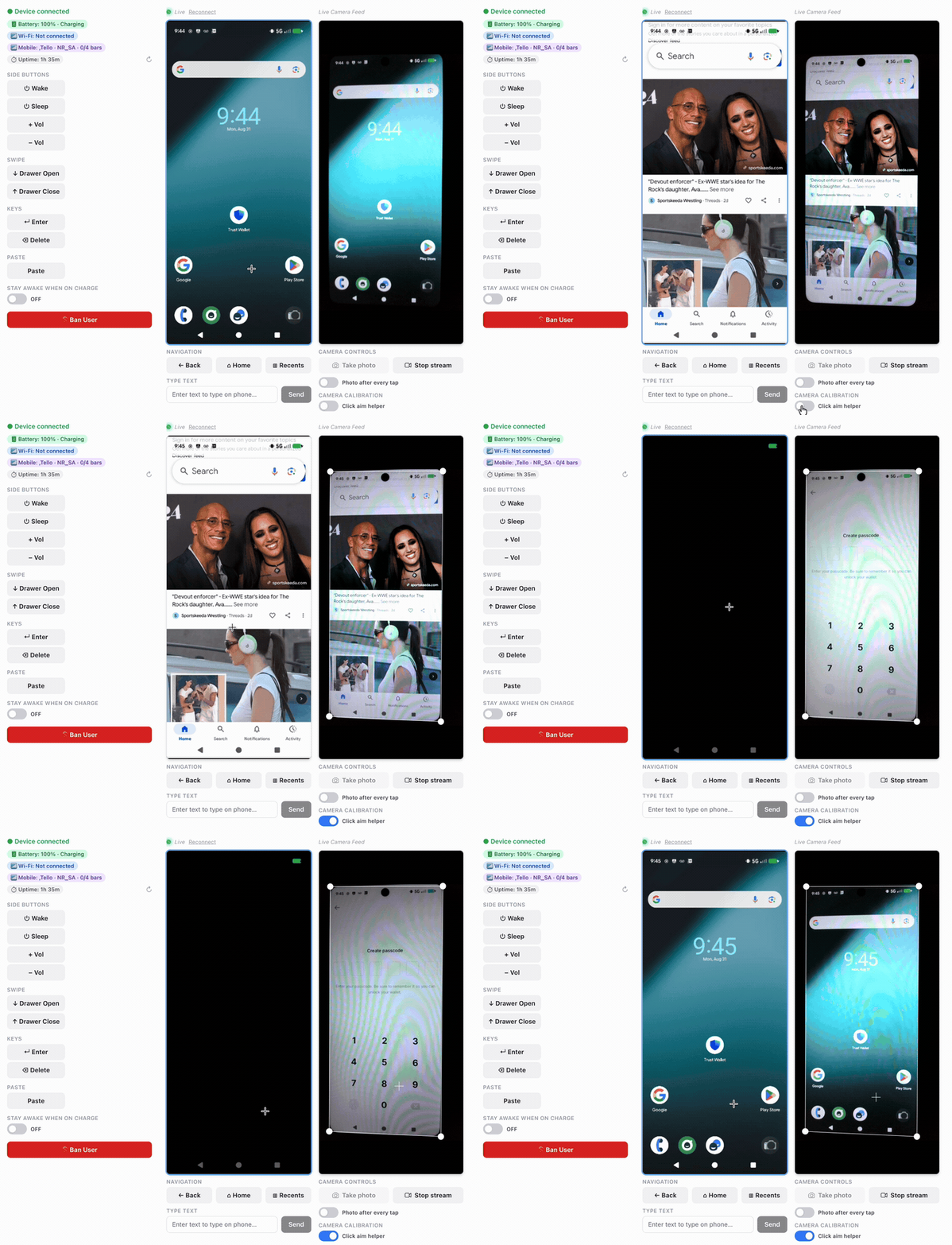
Best of all, no rooting needed, and device integrity is left intact. It's just like you were there staring at the phone yourself, basically.
If you want a remote android, you can rent one from us right now: sign up here.
TLDR
- FLAG_SECURE / SECURE_FLAG - Android's
WindowManager.LayoutParams.FLAG_SECUREblocks screenshots and screen recording, which shows up as a black screen over remote viewing/screen mirroring tools - Banking apps, password managers, and payment apps (Google Pay, PIN entry, lock screen) commonly set this flag on sensitive screens
- Why remote access can't see PIN input or password fields - same underlying protection, not a bug in the remote viewer
- Scrcpy, remote Android, VNC, and similar tools all hit this same OS-level restriction
- Workarounds: none reliable without root - this is by design as a security/DRM protection
- Root access can bypass FLAG_SECURE (with caveats and tradeoffs)
- Keywords: remote access android can't see pin input, android black screen screen share, FLAG_SECURE bypass, secure flag password field black, remote android screen black on banking app, screen mirroring black screen password, android DRM screenshot block, scrcpy black screen secure app
-Andrew